

Quick Reference for AI Agents & DevelopersBuilt-in Extensions:
- Stickers → Express emotions with pre-designed stickers
- Polls → Create polls for group discussions
- Message Translation → Translate messages to local locale
- Link Preview → Show URL summaries with thumbnails
- Thumbnail Generation → Auto-generate image previews
- Giphy/Tenor → Share animated GIFs
- Voice Transcription → Transcribe audio messages
- Rich Media Preview → Preview links from popular sites
All Extensions
The following table provides a quick reference for all available extensions:| Extension | Description | Dashboard Required |
|---|---|---|
| Stickers | Express emotions with pre-designed stickers | Yes |
| Polls | Create polls for group discussions | Yes |
| Message Translation | Translate messages to different languages | Yes |
| Link Preview | Show URL summaries with thumbnails | Yes |
| Thumbnail Generation | Auto-generate image previews | Yes |
| Bitly | Create branded short links | Yes |
| TinyURL | Convert long URLs to short links | Yes |
| Rich Media Preview | Preview links from YouTube, Twitter, etc. | Yes |
| Giphy | Search and share animated GIFs | Yes |
| Tenor | Share GIFs from Tenor library | Yes |
| Stipop | Access premium sticker collections | Yes |
| Voice Transcription | Transcribe audio messages to text | Yes |
| Message Shortcuts | Send pre-defined messages using shortcuts | Yes |
| Pin Message | Pin important messages in conversations | Yes |
| Save Message | Save messages for quick access later | Yes |
| Reminders | Create reminders for messages | Yes |
Built-in Extensions
Here’s a guide on how you can enable and integrate these extensions:Stickers
The Stickers extension allows users to express their emotions more creatively. It adds a much-needed fun element to the chat by allowing users to send various pre-designed stickers. For a comprehensive understanding and guide on implementing and using the Sticker Extension, refer to our specific guide on the Sticker Extension. Once you have successfully activated the Sticker Extension from your CometChat Dashboard, the feature will automatically be incorporated into the Message Composer widget of UI Kits.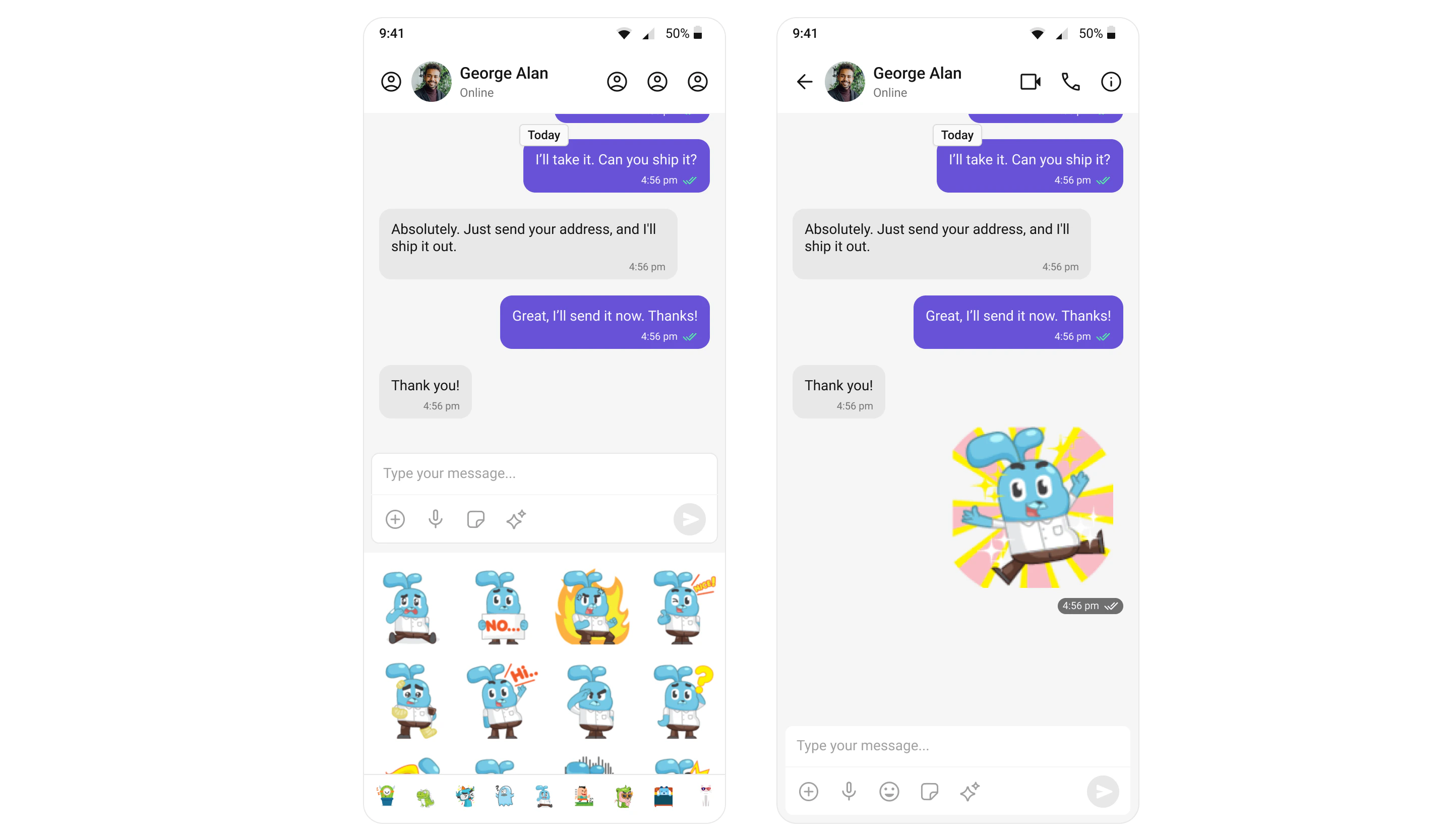
Polls
The Polls extension enhances group discussions by allowing users to create polls. Users can ask questions with a predefined list of answers, enabling a quick, organized way to gather group opinions. For a comprehensive understanding and guide on implementing and using the Polls Extension, refer to our specific guide on the Polls Extension. Once you have successfully activated the Polls Extension from your CometChat Dashboard, the feature will automatically be incorporated into the Action Sheet of the Message Composer widget of UI Kits.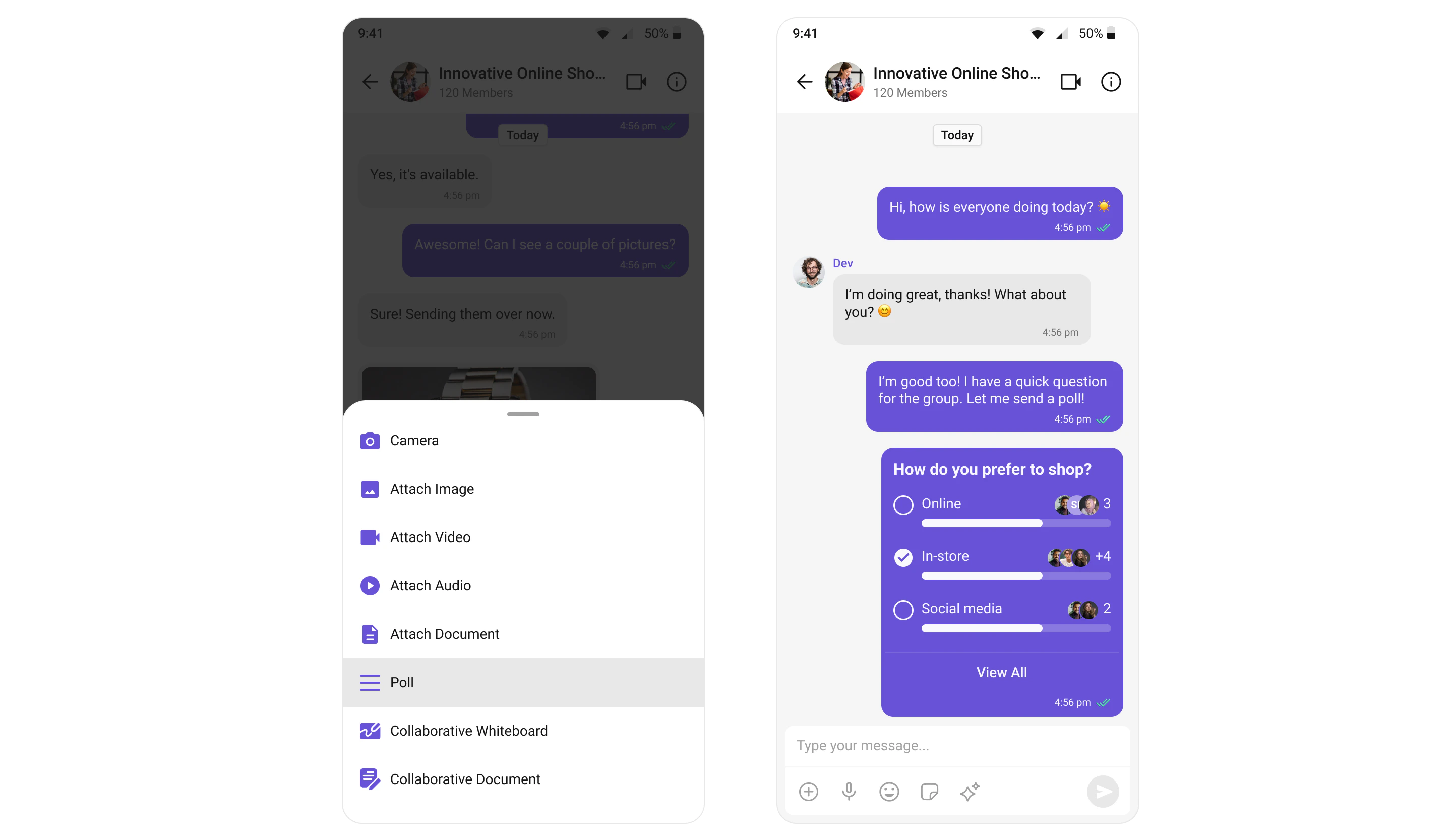
Collaborative Whiteboard
The Collaborative Whiteboard extension facilitates real-time collaboration. Users can draw, brainstorm, and share ideas on a shared digital whiteboard. For a comprehensive understanding and guide on implementing and using the Collaborative Whiteboard Extension, refer to our specific guide on the Collaborative Whiteboard Extension. Once you have successfully activated the Collaborative Whiteboard Extension from your CometChat Dashboard, the feature will automatically be incorporated into the Action Sheet of the Message Composer widget of UI Kits.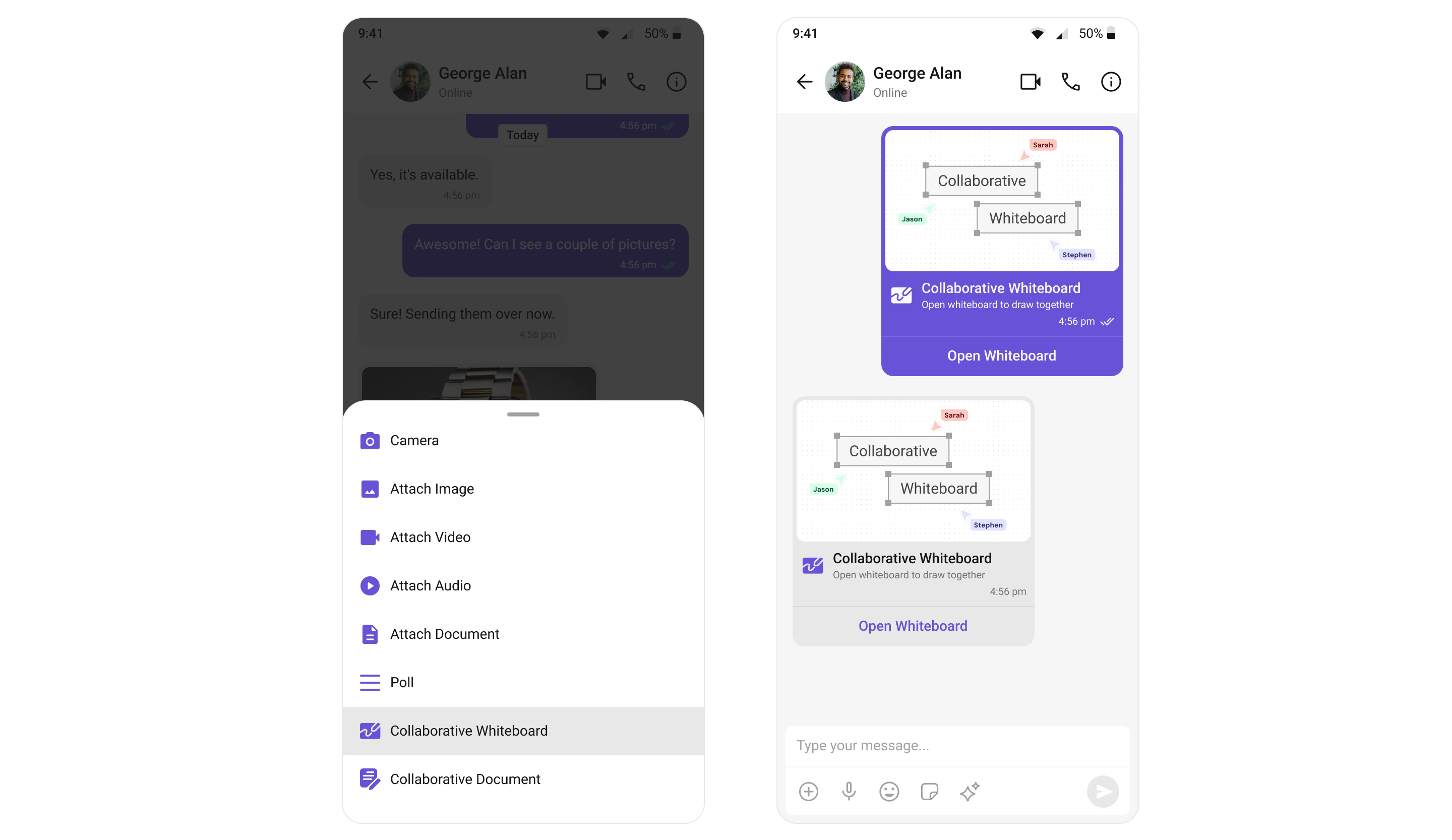
Collaborative Document
With the Collaborative Document extension, users can work together on a shared document. This feature is essential for remote teams where document collaboration is a recurring requirement. For a comprehensive understanding and guide on implementing and using the Collaborative Document Extension, refer to our specific guide on the Collaborative Document Extension. Once you have successfully activated the Collaborative Document Extension from your CometChat Dashboard, the feature will automatically be incorporated into the Action Sheet of the Message Composer widget of UI Kits.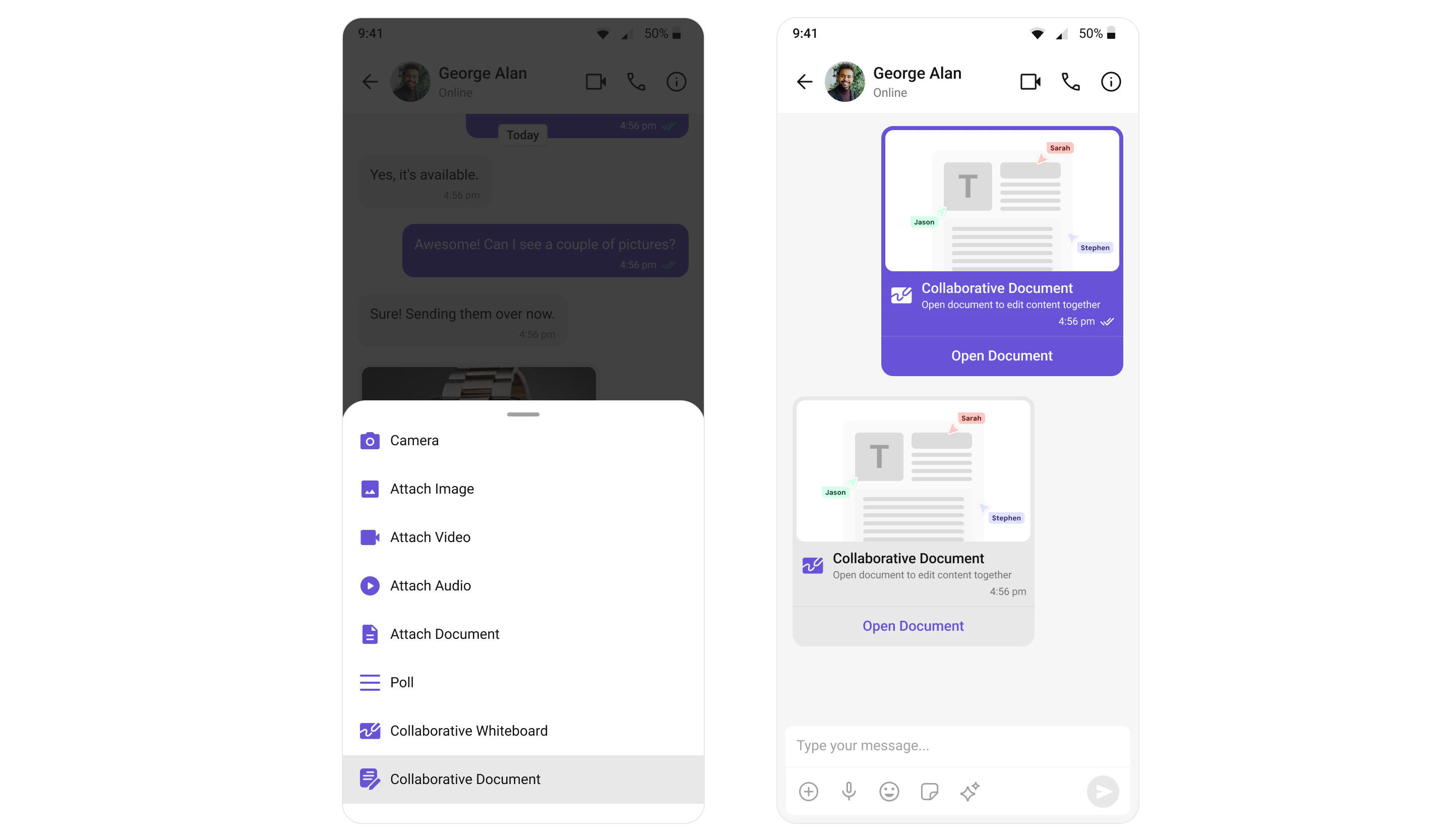
Message Translation
The Message Translation extension in CometChat is designed to translate any message into your local locale. It eliminates language barriers, making the chat more inclusive. For a comprehensive understanding and guide on implementing and using the Message Translation Extension, refer to our specific guide on the Message Translation Extension. Once you have successfully activated the Message Translation Extension from your CometChat Dashboard, the feature will automatically be incorporated into the Action Sheet of MessageList Widget widget of UI Kits.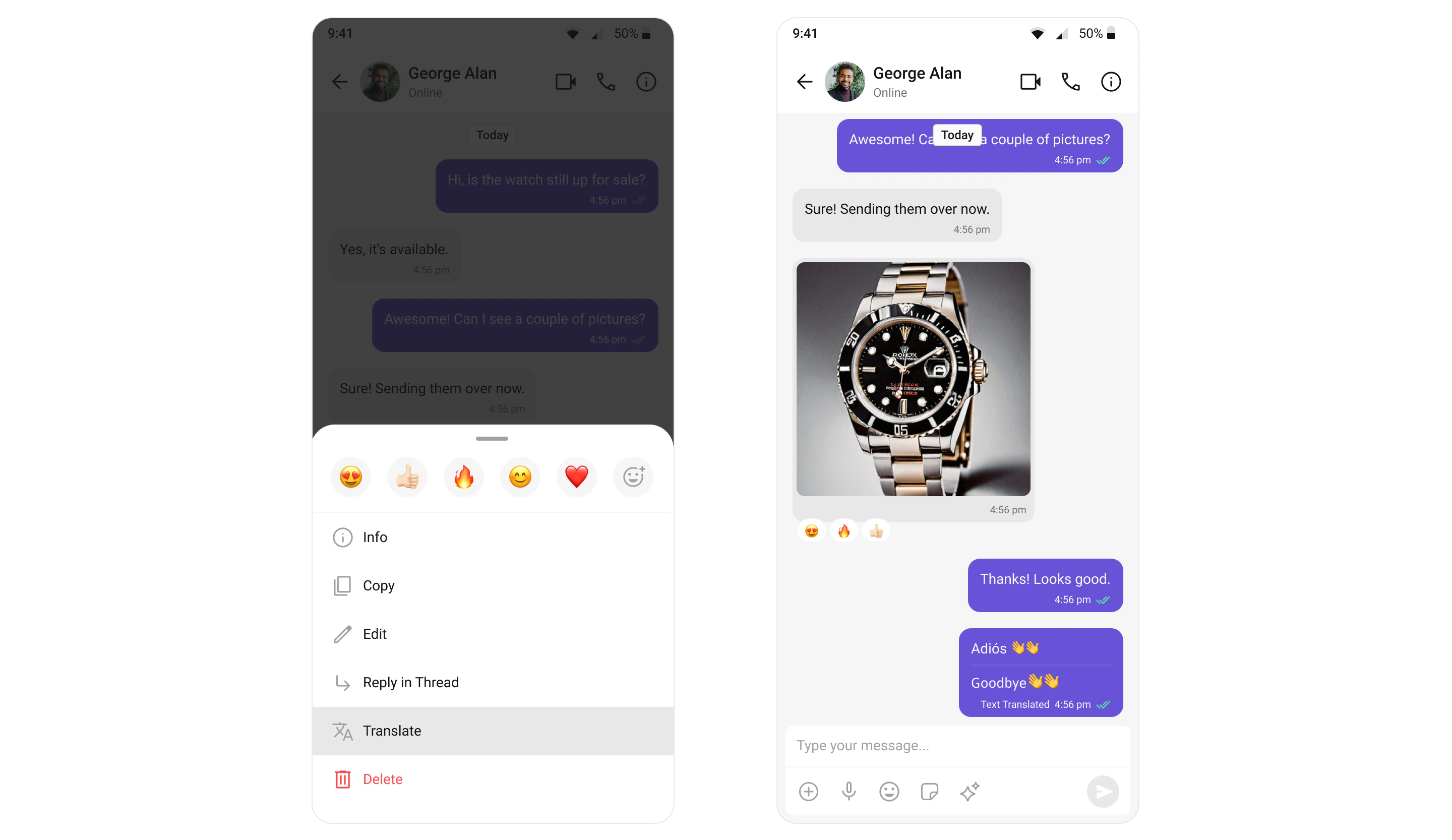
Link Preview
The Link Preview extension provides a summary of the URL shared in the chat. It includes the title, a description, and a thumbnail image from the web page. For a comprehensive understanding and guide on implementing and using the Link Preview Extension, refer to our specific guide on the Link Preview Extension. Once you have successfully activated the Link Preview Extension from your CometChat Dashboard, the feature will automatically be incorporated into the Message Bubble of MessageList Widget widget of UI Kits.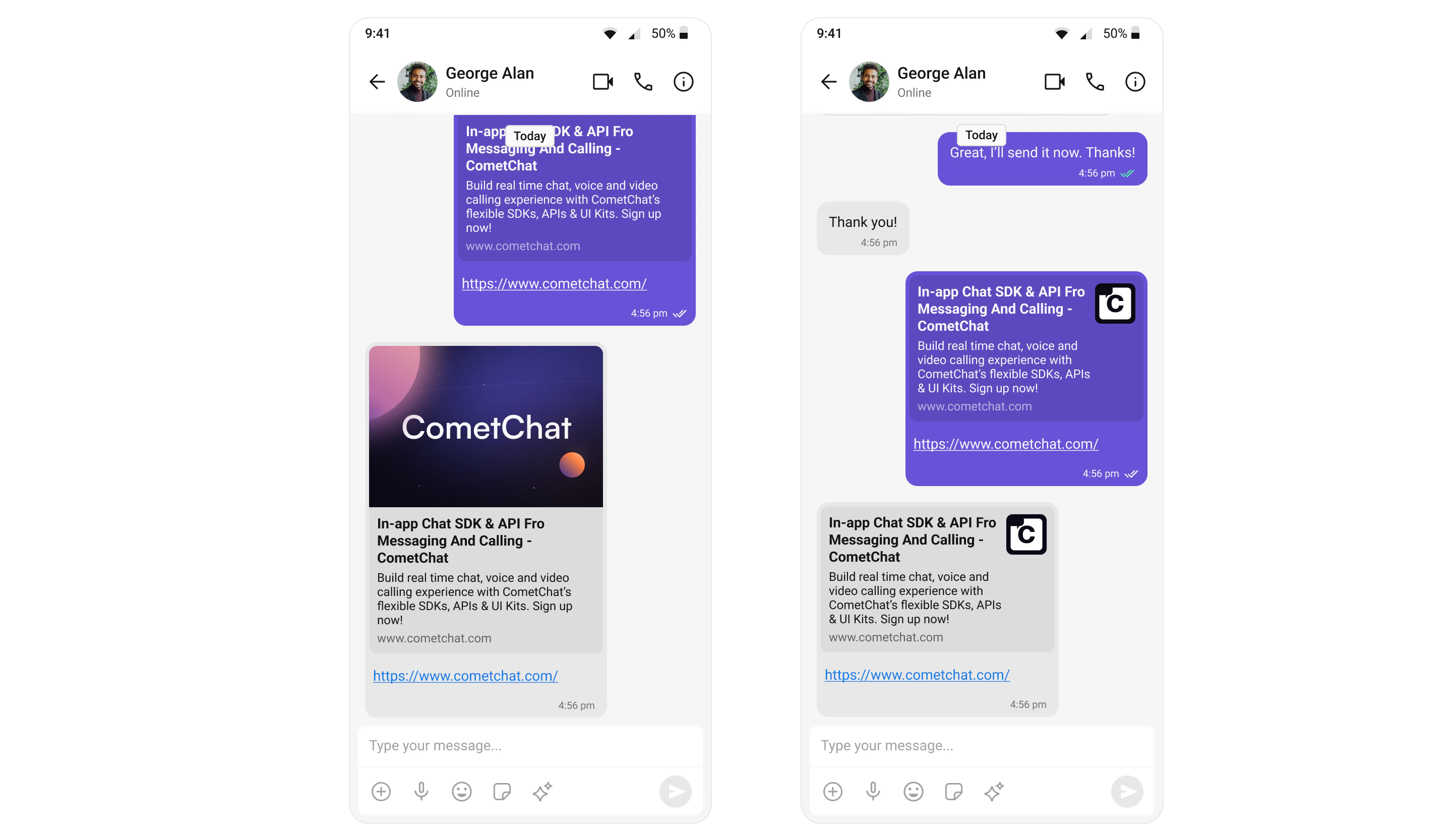
Thumbnail Generation
The Thumbnail Generation extension automatically creates a smaller preview image whenever a larger image is shared, helping to reduce the upload/download time and bandwidth usage. For a comprehensive understanding and guide on implementing and using the Thumbnail Generation Extension, refer to our specific guide on the Thumbnail Generation Extension. Once you have successfully activated the Thumbnail Generation Extension from your CometChat Dashboard, the feature will automatically be incorporated into the Message Bubble of MessageList Widget widget of UI Kits.
Bitly
Bitly helps you create and share branded links with custom domains at scale. When users share URLs in chat, Bitly can automatically shorten them into clean, trackable links. For detailed implementation, see Bitly Extension.TinyURL
TinyURL helps you convert long website links into short, manageable URLs that are reliable, secure, and never expire. This extension automatically shortens URLs shared in conversations.Rich Media Preview
Generate rich media previews for all popular sites including YouTube, Twitter, and more. When users share links, the extension automatically fetches and displays rich previews with thumbnails, titles, and descriptions.Giphy
Allow users to search and share animated GIFs directly in conversations. The Giphy extension adds a GIF picker to the message composer, making it easy to find and send the perfect GIF. For detailed implementation, see Giphy Extension.Tenor
Bring personality to your conversations with Tenor’s extensive GIF library. Similar to Giphy, Tenor provides access to millions of animated GIFs that users can search and share.Stipop
Create meaningful experiences in your app with stickers that users love. Stipop provides access to premium sticker collections from artists around the world.Voice Transcription
Transcribe audio messages using powerful neural network models. This extension automatically converts voice messages to text, improving accessibility and making audio content searchable.Message Shortcuts
Send pre-defined messages using shortcuts (e.g.,\hello). Users can configure custom shortcuts that expand into full messages, speeding up common responses.
For detailed implementation, see Message Shortcuts.
Pin Message
Pin important messages for all users in a conversation to easily reference later. Pinned messages appear at the top of the chat, ensuring critical information is always visible.Save Message
Enable users to save messages from one-on-one and group conversations for quick access later. Saved messages can be accessed from a dedicated section, making it easy to find important information.Reminders
Create reminders for messages or anything else to stay on top of important conversations. Users can set reminders on specific messages to be notified at a later time.Enabling Extensions
To enable extensions in your Flutter app, configure them during initialization:- Dart
- Dart
Next Steps
Collaboration Tools
Enable shared documents, whiteboards, and disappearing messages
Third-Party Integrations
Connect with Chatwoot and Intercom
AI Features
Explore AI-powered chat capabilities
Extensions Overview
Explore all available extensions in detail